The internet isn't out to get you. Most of it is fine, and the parts that aren't follow a handful of patterns. Once you can spot those patterns, you don't have to be scared of every link.
This guide explains how the common tricks work, why they work, and the small habits that stop them. It starts simple and gets more technical as you go, so read as far as you like. Each section is marked with how deep it goes.
Start here: five habits that stop most scams
If you only read one part, read this one. Together, these five habits stop almost every scam in this guide.
- Sign in by going to the site yourself. Type the address or use a bookmark. Never sign in through a link someone sent you, however real it looks.
- Use a different password for every account, and let a password manager remember them. One leaked password then can't open your other accounts.
- Turn on two-step sign-in (2FA) everywhere that offers it, starting with your email and Discord. An authenticator app is better than a text message.
- Only run programs you went looking for, from the maker's own site or a store you trust. A game, a cheat or a "tool" someone sends you is a program, whatever the file is called.
- When something rushes you, slow down. Real companies don't give you ten minutes to save your account. Scammers do, because rushing is how they win.
That's it. Everything below is the why behind those five, and what to do in the moments they don't cover.
Myth: "You can get hacked just by clicking a link." Reality: For almost everyone, almost all of the time, a link on its own does nothing. The danger is the next step: typing your password into a fake page, approving something, scanning a code, or running a download. Stop before that step and you're fine.
Words you'll see in this guide
A few words come up again and again. Here's what they mean, so the rest of the guide doesn't have to stop and explain.
- Phishing: a fake message or page that tricks you into handing over a password, a code or money. Named after fishing: the scammer throws out bait and waits.
- Malware: any program made to harm you. An infostealer is a kind of malware that quietly copies your saved passwords, sign-ins and crypto wallets and sends them to the attacker.
- 2FA (two-factor authentication): a second check after your password, such as a code from an app on your phone.
- Passkey: a newer way to sign in without a password. Your phone or computer proves it's you, and it only works on the real site.
- Token or session: the proof a site gives your browser or app after you sign in, so you don't have to sign in again on every page. Whoever has it is treated as you.
- Domain: the name of a website, like
rosarealism.com. It decides who really owns the page you're on. - Authorizing an app: letting another app or bot do certain things with your Discord account. Discord shows you a list of what it's asking for first.
- Extension: a small add-on that runs inside your browser, like an ad blocker.
- Social engineering: tricking a person instead of breaking a computer. Most scams are this.
How scams actually work
Almost no scam starts by "hacking" anything. It starts by getting you to do something yourself: sign in, scan, approve, download or pay. To get you there, scammers lean on a few feelings that make anyone act fast.
- Urgency: "Your account will be deleted in 24 hours."
- Fear: "You've been reported. Verify now or get banned."
- Reward: "Free Nitro for 3 months, only 50 left."
- Curiosity: "lol is this you in this video?"
- Authority: "This is Discord Trust & Safety."
- Trust: the message comes from a friend, because the friend's account was taken first.
Watch how they want to be paid, too. Real companies never ask for gift cards, crypto, or money sent to a stranger through a payment app. If anyone wants the code on the back of a gift card, it's a scam, every time.
None of these feelings are a sign you're gullible. They work on everyone, including people who work in security. The trick is noticing the feeling and treating it as a signal to slow down.
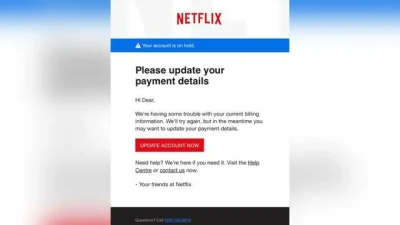
Here's a real one, shared by the US Federal Trade Commission. It claims your account is on hold, rushes you to "update" your payment, and greets you as "Dear" instead of by name. Netflix had nothing to do with it.
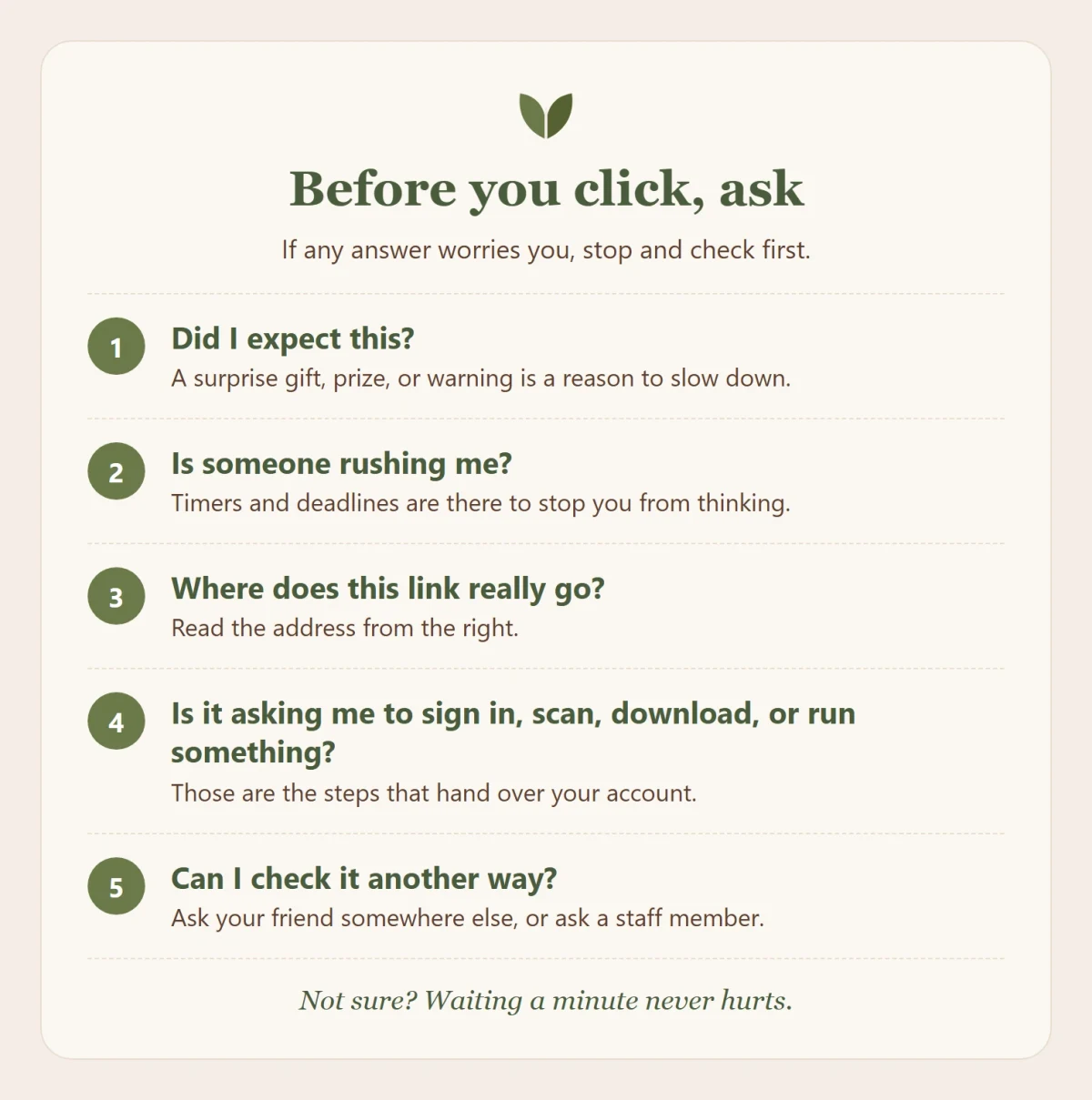
Myth: "Only old or clueless people fall for scams." Reality: Scams are designed to catch busy, tired or excited people at the wrong moment. Young people and gamers are targeted constantly, because their accounts and items are worth money.
Reading a link before you trust it
A link can say anything in its text and go somewhere else entirely. The only part that tells you who owns a page is the domain, and there's a simple way to find it.
Read the address from the right. Find the first single slash after https://. The two words just before it, joined by a dot, are the real site. Everything to the left of that is decoration the owner can choose freely. (Some countries use two-part endings, like bbc.co.uk. There, it's the last three pieces.)
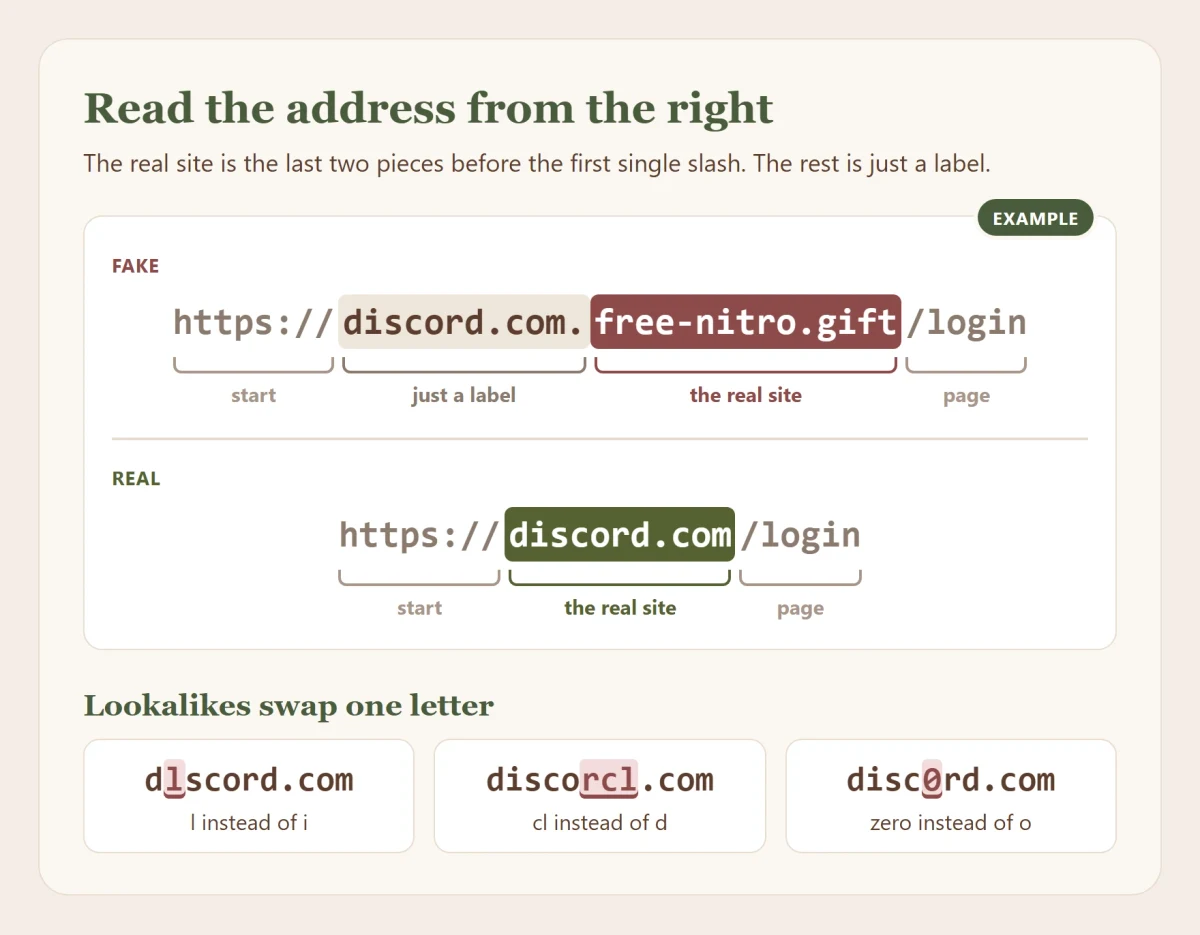
So in https://discord.com.free-nitro.gift/login, the real site is free-nitro.gift. The discord.com at the start is just a label the scammer picked. In https://discord.com/login, the real site is discord.com.
Watch for these tricks too:
- Lookalike letters:
dlscord.com(an L instead of an i),disc0rd.com(a zero),discorcl.com(c and l squeezed together to look like a d). - Extra words:
discord-support.com,discord-nitro-gift.com,steamcommunity-trade.com. A company's own domain is short and plain. - An @ in the address: in
https://discord.com@verify-login.net/, everything before the@is ignored. You'd land onverify-login.net. - Short links:
bit.lyand similar hide where you're going. If you don't know the sender, don't open it. - Links that look fine but point elsewhere: a button, a picture or a link can say anything. On a computer, hover over it and your browser shows where it really leads, in the bottom corner of the window. On a phone, press and hold it. Read that address before you press.
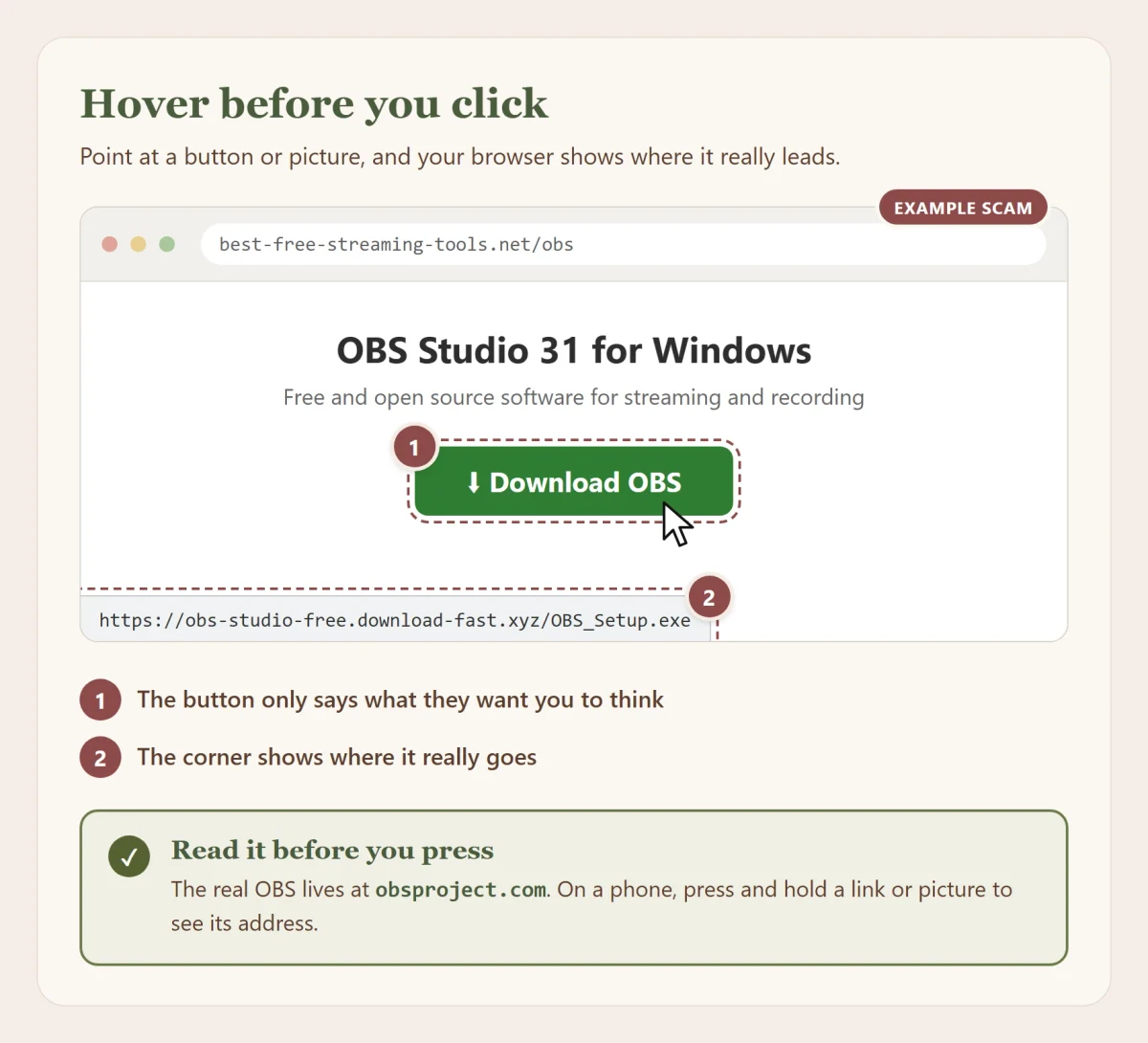
Not sure? Right-click the link, choose Copy Link, paste it into a message box without sending it, and read it from start to end. You can also paste it into VirusTotal, a free site that checks a link against dozens of scam lists at once. It checks files too, more on that under Downloads, games and mods. A clean result means nobody has reported it yet, not that it's safe, so it doesn't replace reading the address yourself.
A password manager helps here more than people expect. It only fills in your password on the real domain, so if it doesn't offer to fill in, stop and look at the address.
Discord's real addresses
Discord's own links start with discord.com, discord.gg (invites), discord.gift (gifts) or dis.gd (Discord's own short links). Anything else claiming to be Discord isn't. A real discord.gg invite can still lead to a server run by scammers, though: the address tells you whose website it is, not who's waiting there.
If your browser shows a red Dangerous site warning, or asks Did you mean...? about an address that looks like a site you know, believe it and go back.
Path of Titans accounts live at alderongames.com, and the game's own site is pathoftitans.com. A "free Marks" or "free skins" site anywhere else is after your sign-in. Get the game only from Alderon or your platform's store.
Rosa's are rosarealism.com and rwrid.app. If a "Rosa" link goes anywhere else, it isn't us.
The padlock doesn't mean safe
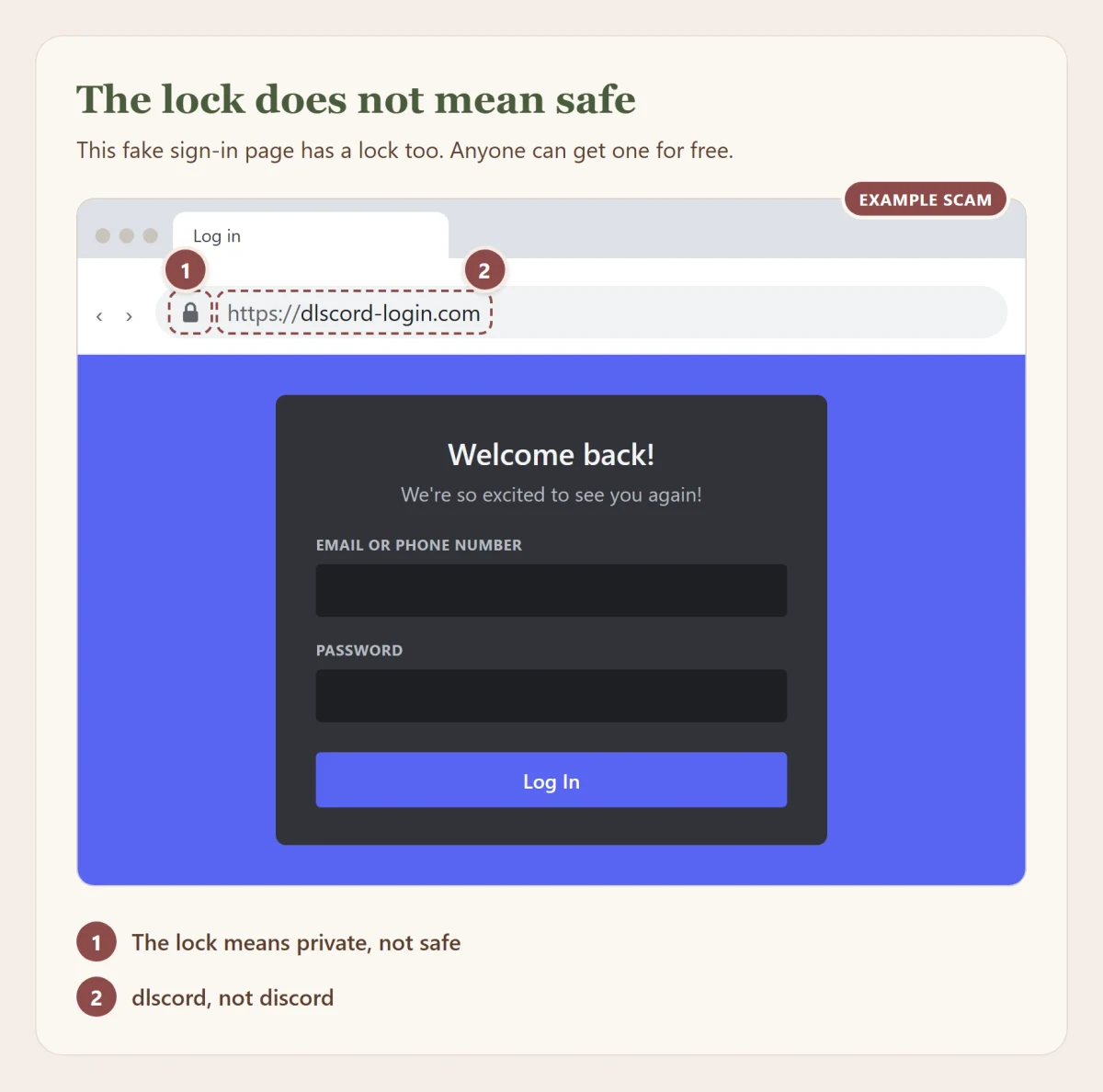
The padlock means your connection to that site is private: nobody in between can read it. It says nothing about whether the site is honest. Anyone can get one for free in a few minutes. When the Anti-Phishing Working Group counted in 2021, more than 8 in 10 phishing sites had one.
Chrome actually swapped the padlock for a plain settings icon in 2023, because so few people knew what it meant. What Chrome still does is warn you when a connection isn't private. A "Not secure" warning on a sign-in page means stop.
Myth: "HTTPS means the website is safe." Reality: HTTPS means your connection to the website is private. A scam site with HTTPS is still a scam site, you're just talking to the scammer privately.
Checking an email
Email is where a lot of scams start, because anyone can type any name into the "From" line. A message that says it's from "Discord Support" only tells you what the sender typed. What counts is the address behind the name.
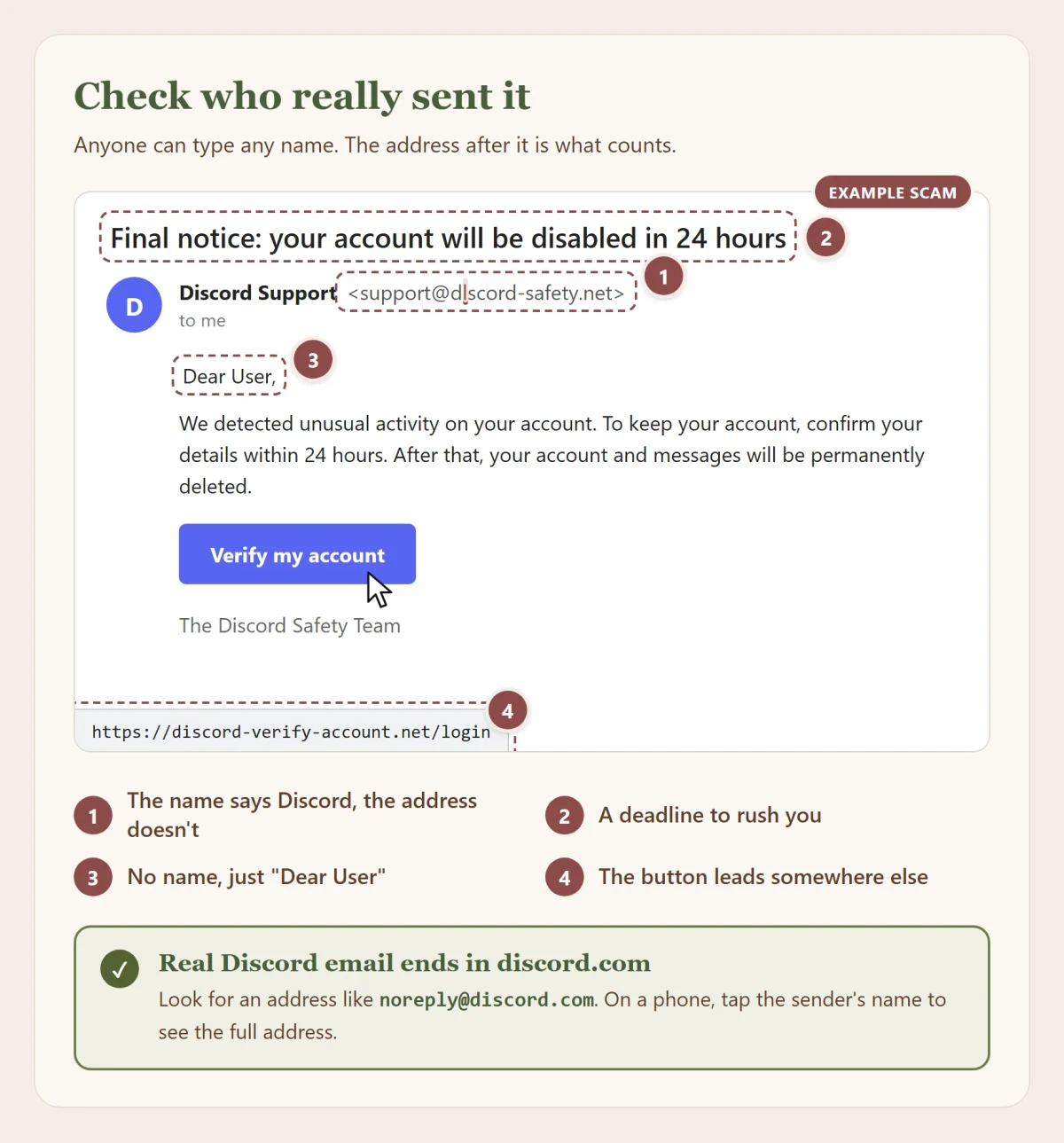
- See the real address. On a phone, tap the sender's name. On a computer, point at it or click it. The full address appears.
- Read the part after the @. It should be the company's own domain and nothing else, read from the right like a link. Watch for swapped letters (
dlscord), extra words (discord-support) or a different ending. A company never writes to you from a Gmail or Outlook address. - Take the warnings seriously. Gmail shows a yellow or red banner when a message looks off, and Outlook shows a question mark when it can't confirm who sent it. No warning doesn't mean safe, though.
- A blue checkmark helps a little. In Gmail it means the company proved the address and logo are theirs. It doesn't make the message safe, and plenty of real companies don't have one.
- Hover before you click. Point at a link or button and read where it really goes, just like on a website. On a phone, press and hold.
- Be careful with attachments. A real document never needs your password to open. Be extra careful with QR codes inside PDFs, and with "someone shared a file with you" emails you didn't expect.
- When in doubt, go there yourself. Open the app or type the site's address. If the message is real, you'll find the same thing there.
Real Discord email comes from an address ending in discord.com, like @m.discord.com or noreply@discord.com. Steam writes from @steampowered.com.
Typed your password into one? Change it on the real site straight away, turn on two-step sign-in, and follow If something went wrong. Then report the email: in Gmail, open the three dots and choose Report phishing. In Outlook, choose Report and then Report phishing.
Myth: "Scam emails are easy to spot because they're full of spelling mistakes." Reality: Many are written by AI now and read perfectly. Check the address and where the links go, not the spelling.
What really happens when you click a link
Clicking a strange link is rarely the end of the world, and it helps to know why. A link only takes you somewhere. What happens next decides whether anything bad happens.
- A fake sign-in page. Nothing happens unless you type your password or code into it. Close the tab and you're fine.
- A request to approve an app, or to scan a QR code. Nothing happens unless you press Authorize or scan it.
- A download. Nothing happens unless you open the file you downloaded. Delete it instead.
- Instructions to paste or run something. Nothing happens unless you follow them. Don't.
- A page that attacks your browser directly. This is the rare one. It needs a bug in your browser that hasn't been fixed yet, which is why keeping your browser updated matters so much.
So if you clicked something and then closed it without typing, approving, scanning or opening anything, you can breathe. Keep your browser and phone updated and move on.
If you did take one of those steps, don't panic either. Go to If something went wrong and follow the steps in order.
Scams you'll meet on Discord
These are the ones that show up again and again on Discord. They change their wording all the time, but the moves underneath stay the same.
Free Nitro and gift links
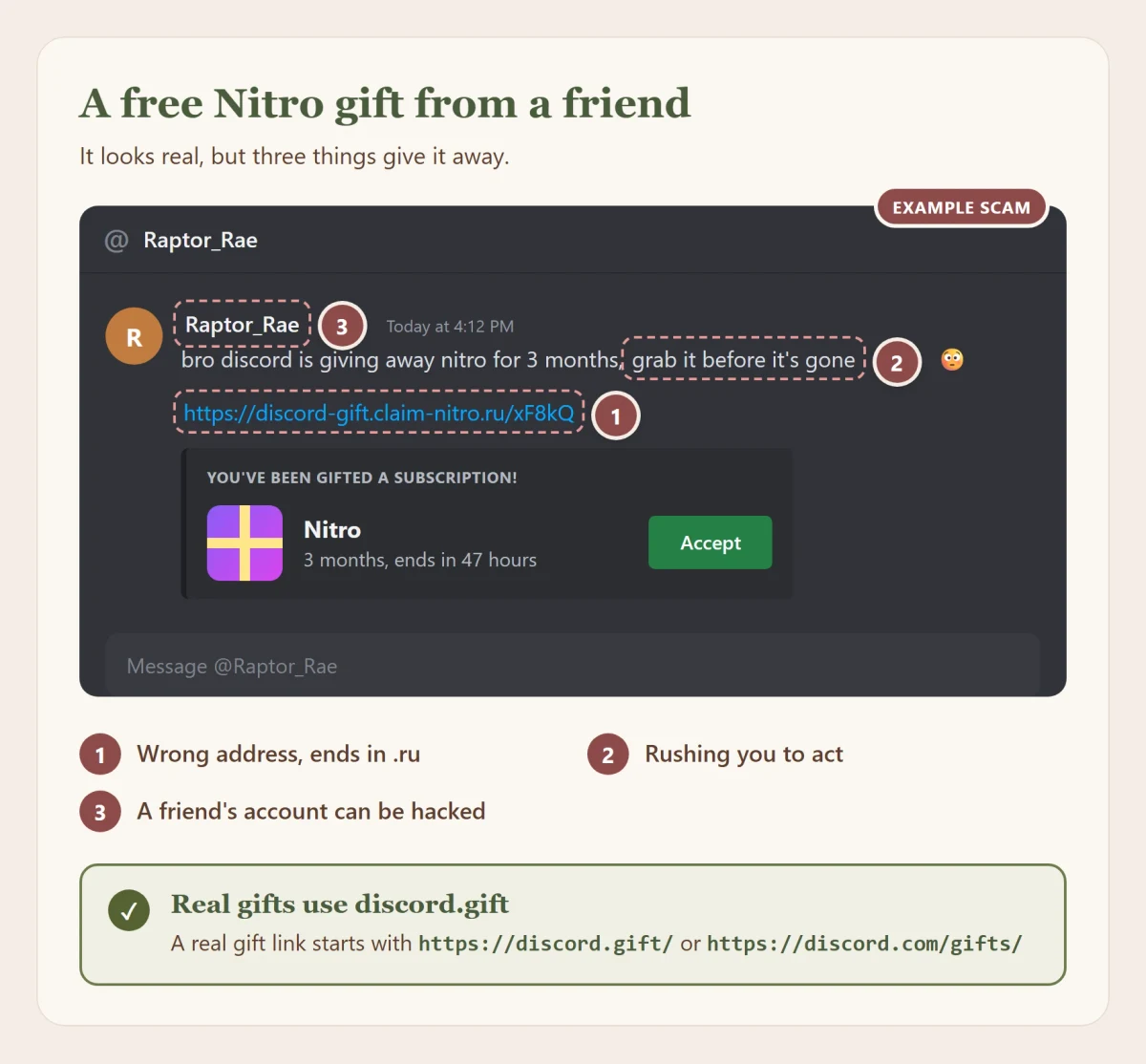
A message, often from a friend, says Discord or Steam is giving away free Nitro or a game. The link goes to a page that looks like Discord and asks you to sign in or scan a QR code to claim it.
- Real Discord gifts show up as a gift card inside Discord, and their links start with
discord.gift/. You redeem them inside Discord, and you never have to sign in again to accept one. - Discord says it has never made a bot that gives away free products. A "Nitro bot" is a scam.
- Nitro is only sold inside Discord, through Discord's official store on Amazon, or as an official Discord gift card.
- "Free Nitro generators" don't exist. Any program that promises one is malware.
"You've been reported" and fake Discord staff
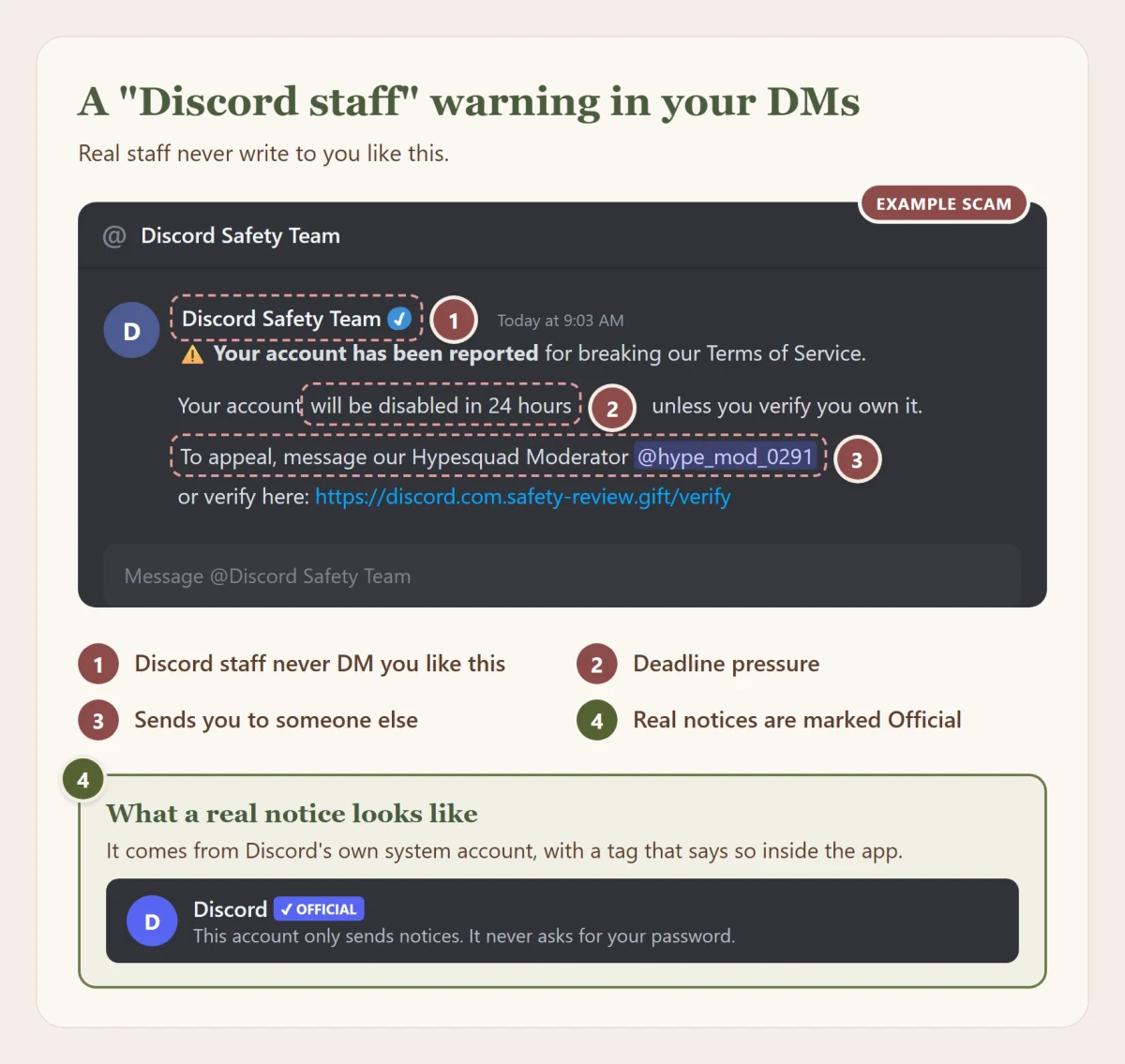
Someone says your account was reported, by mistake or for breaking the rules, and will be banned unless you "verify" now. Often they pass you on to a "Discord moderator" or "HypeSquad admin" to sort it out. That person asks for your password, a code, a QR scan, a payment or remote access to your computer.
- Discord staff never contact you through direct messages for support, and they'll never ask for your password or your token.
- A real message from Discord carries an OFFICIAL badge, and you can't reply to it. A "Discord Support" account you can chat with is a person pretending.
- Real emails from Discord come from
@m.discord.comornoreply@discord.com. Discord doesn't phone people.
- Reports don't get settled in a direct message, and nobody can fix one for money.
- The same trick runs on Steam: a "Steam admin" on Discord who needs your Steam Guard code or asks you to "move" your items. Real Steam staff won't contact you on Discord to sort out your account.
- Rosa staff work the same way: we'll never ask for your password, a code or a payment in a direct message.
"Verify your age" and requests for your ID
Discord is starting to ask some people to confirm their age. The real check only ever happens inside the Discord app, and the result arrives as a message from Discord's official account. Discord says it will never ask you to confirm your age by email or text.
So a bot, a website or a direct message that wants a photo of your ID or a selfie to "verify" you is a scam. Never send a picture of your ID to anyone in a direct message, staff included. Rosa will never ask for it.
QR codes that "verify" you
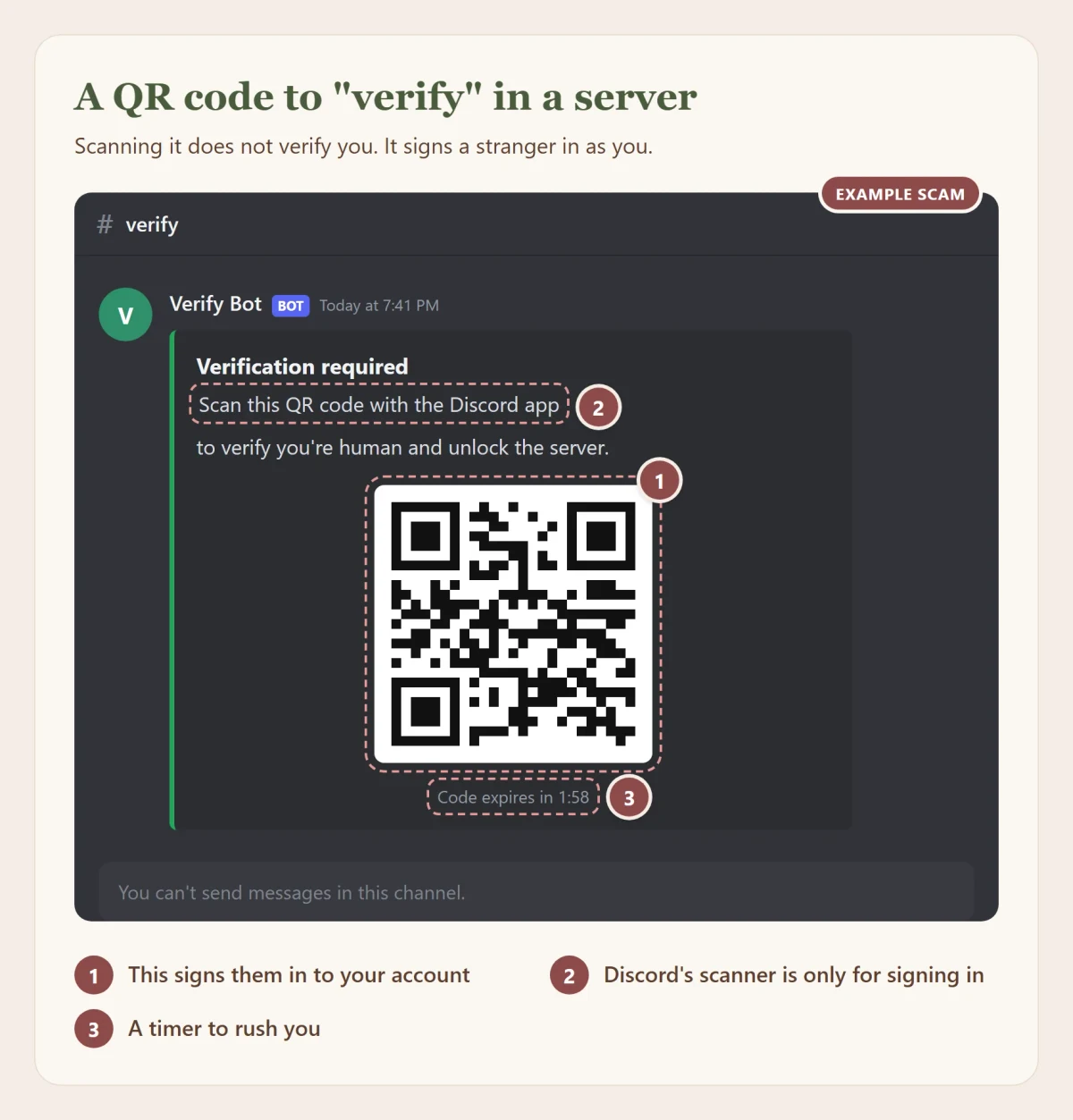
A server or a bot asks you to scan a QR code with the Discord app to "verify you're human" or "claim a reward". That QR code is a Discord sign-in code from the scammer's own screen. Scanning it signs them in to your account, and Discord warns this can get past your password and 2FA.
Discord's QR scanner is for one thing: signing in on your own computer. Discord's own rule is simple: never approve a QR code sign-in that you didn't make yourself. If you scanned one by accident, press Cancel on the screen that asks you to confirm. If you already confirmed, change your password straight away, which signs everyone out.
Fake "verify you're human" pages
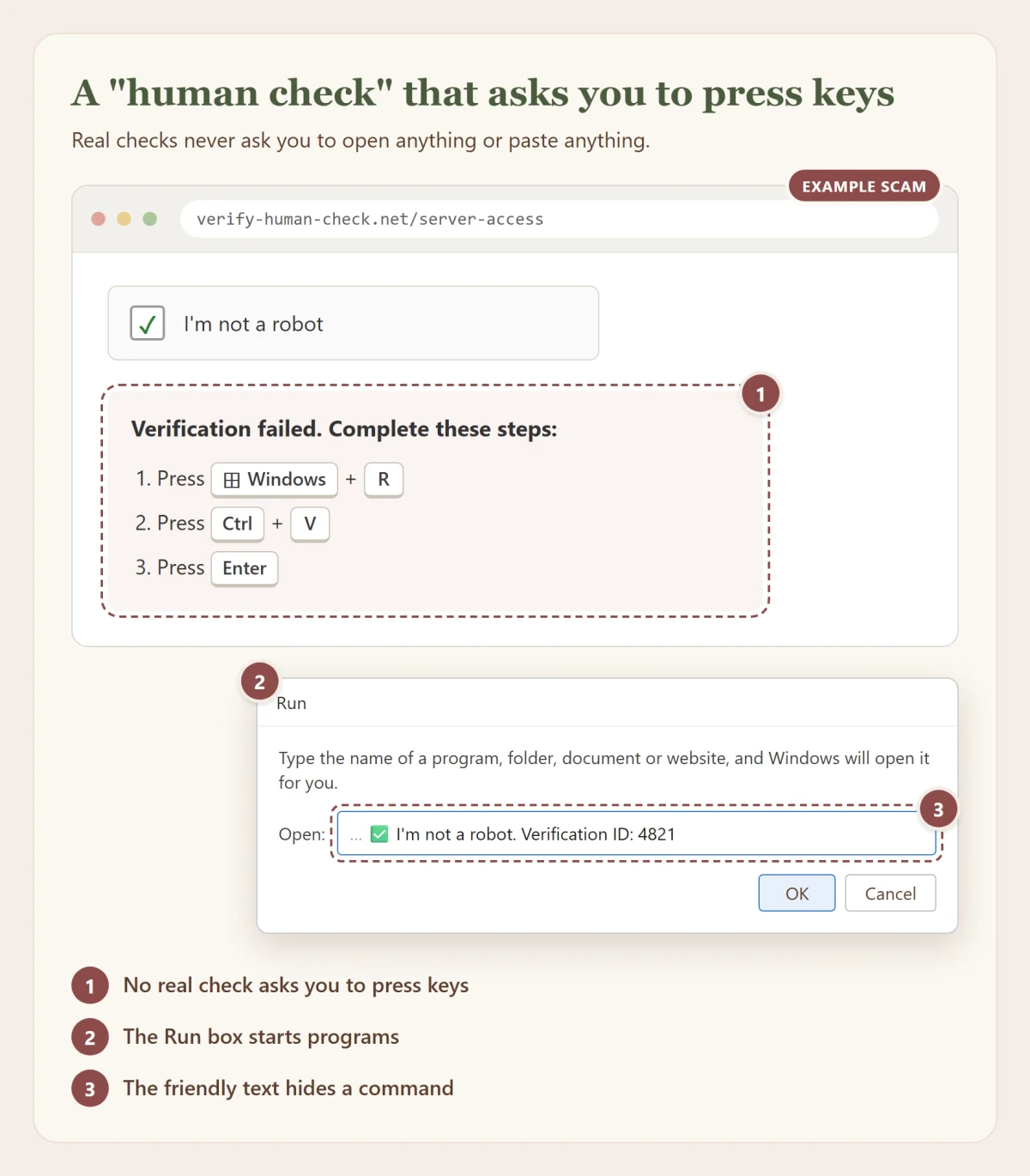
This one is newer and very effective. In 2025, researchers found a fake server "verification" bot whose malware had been downloaded more than 1,300 times. A page looks like a normal "I'm not a robot" check, and then the check pretends to fail. Then it asks you to press Windows + R, then Ctrl + V, then Enter. While you were "verifying", the page quietly copied a command, and those three keys run it. That command installs malware.
On a Mac, the same trick can ask you to paste something into Terminal and type your password.
As the US Federal Trade Commission put it in June 2026: real CAPTCHAs won't ask you to run commands on your device. If a page tells you which keys to press, it's the scam. Close it. If you already did it, go to If something went wrong.
"Can you test my game?"
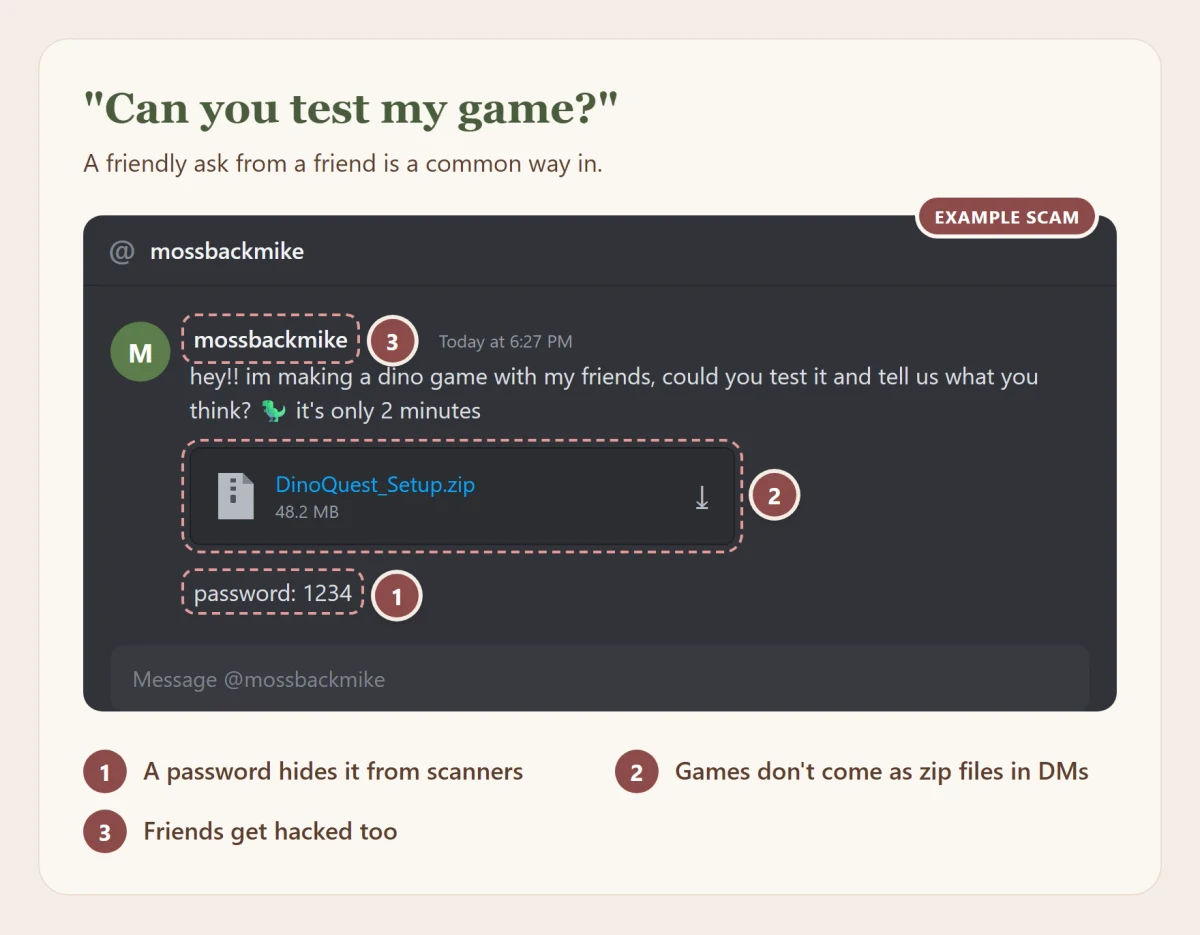
Someone, often a friend or a nice person from a server, asks you to try a game they're making. They send a file or a link to a slick website, sometimes with a password for the zip. The "game" is an infostealer. It might even show a fake error message so you think it just didn't work.
- Real indie games are on Steam, itch.io or the developer's own store page, not a zip in your direct messages.
- A password on a zip file is a red flag on its own: it stops virus scanners from looking inside.
- If a friend asks, check with them another way first, by voice or in another app. Their account may not be them right now.
Your friend suddenly needs money, votes or a favor
Once a scammer has an account, they use it to message every friend and server it's in. The messages sound a bit off: asking for money, a vote in a contest, a gift card, help with "a report", or for you to try something. The person you know would never send it, because they didn't.
Check with them somewhere else before you do anything. And if your friend's account is sending scams, let them know through another way, then report the messages to Discord.
A voice message or even a video call that sounds like your friend can be faked now, from a few seconds of their clips. If it asks for money, codes or pictures, hang up and reach them a way you already know.
Bots and apps that ask for too much
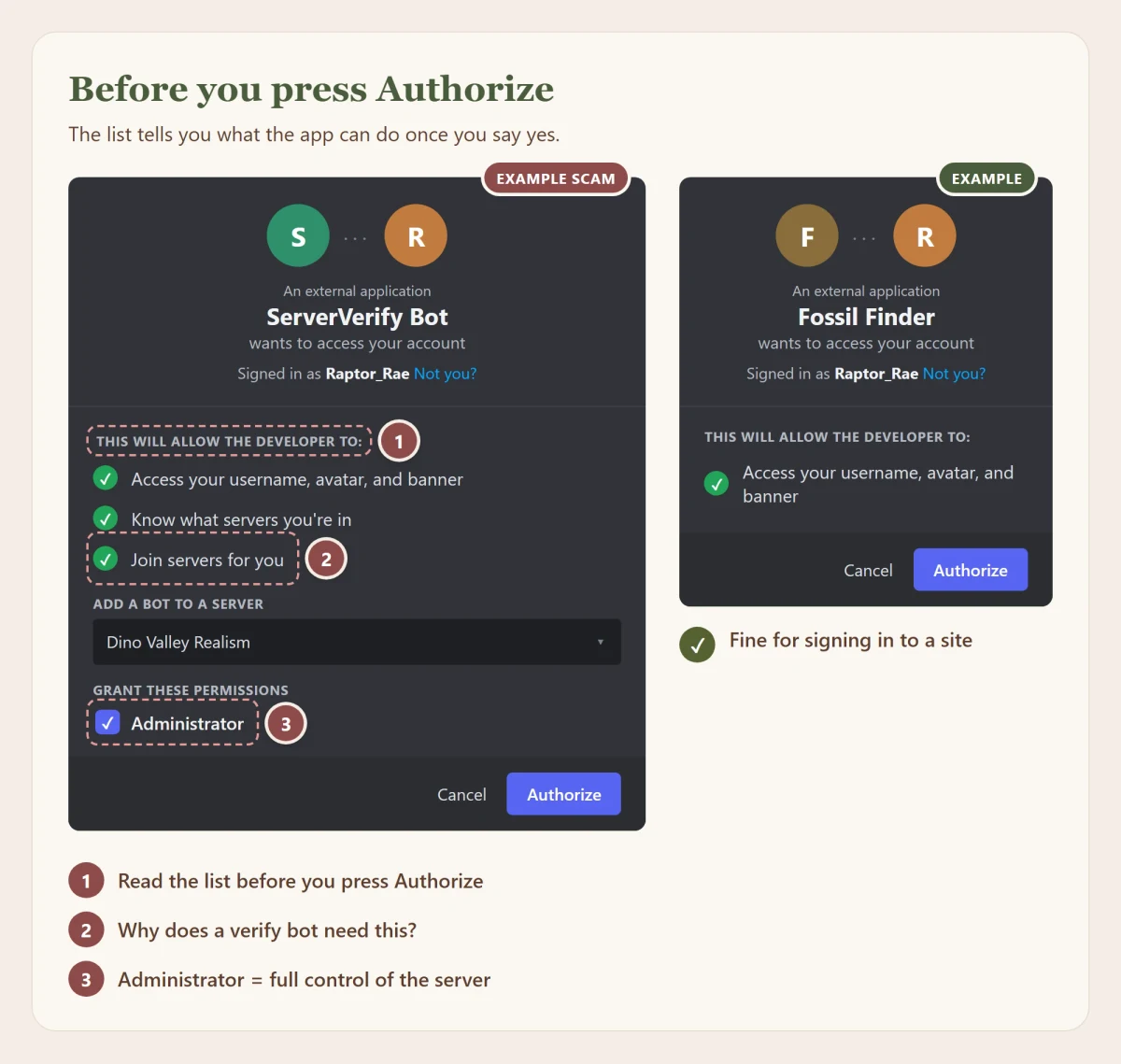
Discord lets apps and bots ask for access to parts of your account. Before anything happens, Discord shows a screen listing exactly what it wants. Read that list as carefully as a contract.
- A site that only wants "your username, avatar and banner" is asking to know who you are. That's normal. Signing in to rosarealism.com asks for that, your email address, which servers you're in and your roles in ours, so we can check you're part of the Reserve.
- A "verification" bot that wants to join servers for you, or wants Administrator in your server, is asking for far more than verifying needs.
- Authorizing an app doesn't give it your password. It gets only what's on the list, until you take it back in User Settings > Connected Apps > Authorized Apps. On some versions of Discord, it's User Settings > Authorized Apps.
Giveaways, crypto and trading
Giveaways that want you to sign in, pay a "shipping fee" or connect a crypto wallet are scams. So are "airdrops" and "free mint" announcements that ask you to connect a wallet: approving one can let them empty it. The crypto-draining kit behind one such campaign on Discord emptied more than 30,000 wallets in six months.
In trades for game items or accounts, use the game's own trading system or don't trade. A bought account isn't really yours: the seller still controls its email and can take it back. And a "trusted middleman" suggested by the other side is often the same scammer on a second account. Watch for fake "Sign in with Steam" windows too: in 2026, fake FACEIT "verification" pages drew a whole Steam sign-in box inside their own page. Trust only your browser's own address bar, and check it says steamcommunity.com. Nitro can only be bought inside Discord or from Discord's official store, and Discord can't help with, or refund, a trade made anywhere else.
Art commissions and "jobs"
Someone loves your art and wants to commission you, or offers you easy paid work. Then they "accidentally" send too much money and ask you to send the difference back. The first payment bounces days later, and the money you sent is gone. Real clients don't overpay, and they don't need your bank details to say thank you.
Old invite links that lead somewhere new
Servers that let their custom invite link run out can have it claimed by someone else. A link in an old post, video or website that used to open a real server may now open a fake one. If a server you followed from an old link immediately asks you to "verify" through a website or a command, leave.
Help Discord already gives you
Discord has a few protections switched on for you. They don't catch everything, but they're worth knowing about.
- Discord removes known scam links with its own systems.
- Messages from people who aren't your friends go through a spam filter. You'll find it under User Settings > Messaging Permissions.
- Teens can get a safety alert when someone new messages them and something about it looks off, with tips and a quick way to block or report.
Myth: "If my friend sent it, it's safe." Reality: Taken accounts are the most common way scams spread on Discord, exactly because you trust your friends. Check with them another way first.
If someone threatens to share pictures of you
This one isn't about your account, and it's serious, so here it is plainly. Sometimes a new online friend flirts, sends a picture, and asks for one back. Then they turn on you and demand money, or more pictures, or they'll send it to your friends and family. This is called sextortion. The crime is theirs, not yours, and you're not in trouble.
- Don't pay and don't send more. Paying almost never makes it stop. It only shows them you'll pay again.
- Block them, but keep the evidence. Take screenshots and copy their username before you block.
- Tell someone today. A parent, another adult you trust, or Rosa staff in a ticket. You don't have to handle this alone, and people have helped others through exactly this.
- Report it. Report the account to Discord. In the US, you can also report to the NCMEC CyberTipline.
- Get the picture taken down. If it was taken before you were 18, Take It Down helps stop it spreading across big sites, without anyone needing to see it.
How accounts get taken without any fake link
Lots of people say "I never clicked anything, and my account still got taken." They're usually telling the truth. Here's how.
When you sign in, Discord gives your app a token: the proof that you're signed in, so you don't have to type your password every time you open it. Your browser does the same with cookies for every site you're signed in to. Whoever has that proof is treated as you. They don't need your password, and they don't need your 2FA code, because the signing in already happened.
An infostealer is malware built to collect exactly that. Once it runs on your computer, usually because you opened a game, cheat, mod or "tool" from somewhere you shouldn't have, it copies your Discord token, your browser's saved passwords and cookies, and any crypto wallets, and sends them off. It takes seconds, and many leave no visible sign at all.
An everyday example. Mia downloads a free "unlocked" version of a game from a video description. It installs, crashes, and she forgets about it. Two weeks later her Discord account messages everyone a Nitro scam, her email password is changed, and her Steam inventory is gone. She never typed her password into anything fake. The game she ran two weeks ago took all of it at once.
That's why, when an account is taken and you don't know how, the safe assumption is that the computer itself might be infected, not only the account. Changing your password on an infected computer just hands the new one over too. If something went wrong covers the right order.
This happens to experts too. In 2023, a large tech YouTube channel was taken over after a staff member opened a fake sponsorship file. The attackers used the stolen session to get in without a password or a code.
Myth: "I have 2FA, so nobody can take my account." Reality: 2FA stops people who only have your password, which is most attackers, so keep it on. It can't stop someone who steals your signed-in session from your computer, or who tricks you into scanning a QR code or approving them.
Passwords, 2FA and passkeys
The single biggest thing you can do for your safety is this: a different password on every account. When a site gets breached, attackers try the leaked email and password on every other site they can think of. If you reused it, they get in. If you didn't, the leak goes nowhere.
Nobody can remember fifty different passwords, and you shouldn't try. That's what a password manager is for. Bitwarden (free), 1Password, or the ones built in to your phone and browser all work. You remember one strong password, and it remembers the rest.
What makes a good password
- Long beats complicated. A few random words, like
copper lantern raptor violin, is stronger thanP@ssw0rd!and easier to type. Swapping letters for symbols adds very little. - Never use something people can find out: your birthday, your pet, your favorite team, your username.
- You don't need to change a good password on a schedule. The US standards body NIST tells sites to stop forcing that. Change it when it might have leaked.
- Changing your Discord password now and then does have one real bonus: it signs out every device that's signed in to your account, including any you forgot about. If that gives you peace of mind, every six months is a fine habit.
- Security questions like "your first pet" are just extra passwords that anyone can look up. Make up an answer and save it in your password manager.
Two-step sign-in, from strongest to weakest
- A passkey or security key. Phishing can't beat these, because they only work on the real site. Use them where you can, Discord included.
- An authenticator app, or a sign-in prompt on your phone where you match a number, such as Google Authenticator, Microsoft Authenticator or the one in your password manager. A new code every 30 seconds. A fake page can still ask you for the code, so only type it on a site you opened yourself.
- A text message code. Better than nothing, but scammers can sometimes take over your phone number by talking your phone company into moving it to their SIM card. Ask your phone company for a PIN on your account to make that harder.
- An email code. Only as safe as your email account.
Any of these is far better than none. Whatever you choose, save your backup codes somewhere safe that isn't your phone or your email. They're how you get back in if you lose your phone.
Never type a 2FA code that someone sent you or asked you for. A code is only ever for a sign-in you started yourself.
Your email is the master key
If someone gets into your email, they can reset the password on almost everything else. Give your email the strongest password and the strongest 2FA you have, and check that the recovery phone number and email on it are still yours.
Myth: "A complicated password with symbols is unbreakable." Reality: A strong password you reused is weaker than a simple one you didn't. Uniqueness matters more than symbols.
Downloads, games and mods
Every program you run can do anything you can do on your computer. That includes reading your files, your browser's saved passwords and your Discord sign-in. So the real question with any download isn't "is it a virus?" but "do I trust whoever made this with everything on my computer?"
The riskiest downloads are the ones gamers see most:
- Cracked or "free" versions of paid games and software. One of the most common ways infostealers spread, often through video descriptions and file sharing sites.
- Cheats, "unlockers" and "Nitro generators". They ask you to turn off your antivirus because they're doing exactly what antivirus is made to stop.
- Mods and plugins from random links. Get mods from the game's official workshop or a well-known mod site, and check the comments and the author's history.
- Fake download buttons and search ads. Criminals buy search ads for popular free programs like OBS, VLC, 7-Zip and CCleaner, leading to perfect copies of the real sites. In 2023, a well-known NFT collector lost his accounts this way after clicking a search ad for OBS. Skip results marked "Sponsored" when you download software, and go to the maker's site or a store like Steam or the Microsoft Store.
Files that pretend to be something else
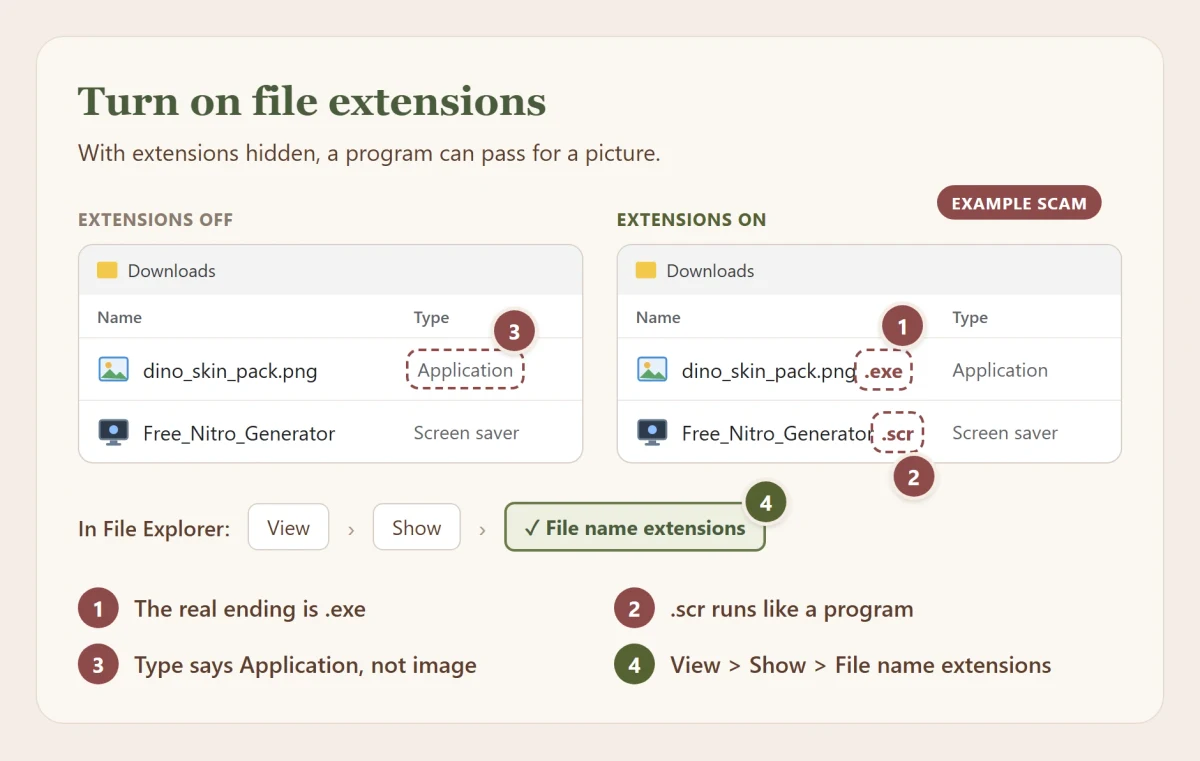
Windows hides the end of file names by default, so dino_skin_pack.png.exe shows up as dino_skin_pack.png, a picture that's actually a program. Turn the real names on: in File Explorer, open View > Show > File name extensions.
Be careful with files ending in .exe, .scr, .bat, .cmd, .msi, .lnk, .js or .vbs, and with .zip, .rar or .iso files that contain them. These can run code. A .png or .jpg that really is a picture can't.
Never paste commands you don't understand
Some "fixes" and "guides" tell you to paste a command into PowerShell, Terminal or the Run box. A single line can download and run anything. If you can't explain what a command does, don't run it, and be extra suspicious of any website that asks you to.
Antivirus helps, but it isn't magic
Windows Security, built in to Windows, gets full marks for protection in independent tests and is enough for most people, so keep it on. But no antivirus catches everything, especially brand new malware, anything hidden in a password-protected zip, or a command you run yourself. It's a seatbelt, not a reason to drive carelessly.
- If a download tells you to turn your antivirus off first, that's your answer: don't run it.
- VirusTotal checks a file against dozens of virus scanners at once. Drop the file on its File tab, or paste a link on its URL tab.
- Its Search tab looks up a website, a domain or a file's fingerprint (its hash) without uploading anything, so you can see whether others already flagged it.
- A clean result means "nothing known", not "safe". Brand new malware often shows zero detections.
- What you upload to VirusTotal can be seen by other people, so never upload anything personal, like documents, photos or files with your name in them. Use Search for those instead.
Myth: "It's on GitHub, so it's safe." Reality: Anyone can upload anything to GitHub. Lots of fake "cheat" and "tool" projects there are malware. A big, well-known project with a long history is a good sign. A brand new one promising something too good to be true isn't.
Browser extensions
An extension lives inside your browser, so it can be very powerful. Chrome, Edge and Firefox all show you what an extension wants before you add it. That list is the important part, and it takes ten seconds to read.
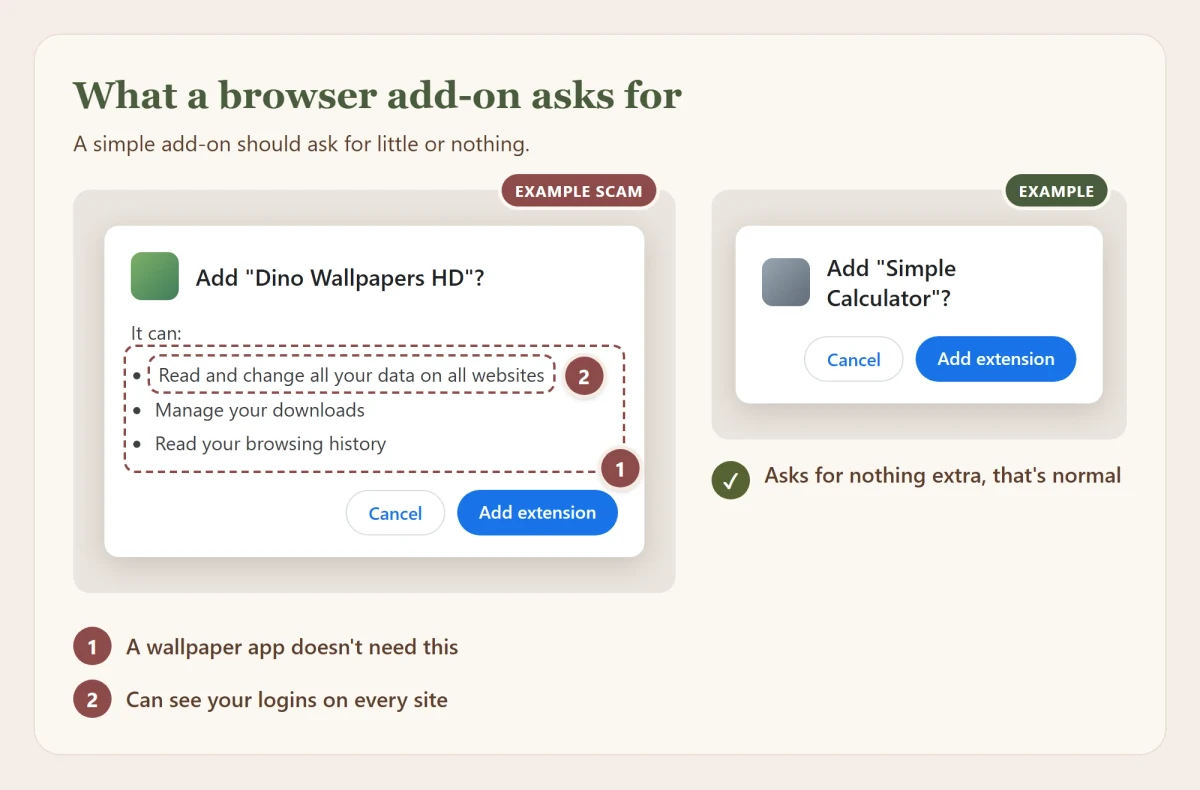
- "Read and change all your data on all websites" means it can see everything on every page you open, including what you type into sign-in forms and the pages you're signed in to. Some extensions genuinely need it, like ad blockers and password managers. A wallpaper or a coupon finder doesn't.
- If something asks for access that doesn't match what it does, don't add it. If you're not sure what a permission means, look it up first.
- Keep only the extensions you actually use, and remove the rest.
- In Chrome and Edge, you can limit what an extension can see: open its Details and, under site access, choose On select (Chrome) or On click (Edge). It then only wakes up when you press it.
Extensions can also change after you install them. A well-liked extension can be sold to a new owner, or its developer's account can be hacked, and the next update quietly turns it bad. That happened to a set of popular Chrome extensions over Christmas 2024. If an extension you've had for ages suddenly asks for new permissions, take that as a warning, not a formality.
Pictures, videos and files
You can't get hacked by looking at a normal picture on Discord. A picture is data, not a program, and it can't run anything by itself.
The honest small print: the apps that display pictures and videos are programs, and programs sometimes have bugs. Very rarely, a specially made file can use one of those bugs. In 2023, a bug in the code most browsers used to show WebP pictures was used this way, and browsers fixed it within days. That's the real lesson: keep your browser, Discord, phone and computer updated, and these bugs are closed before most people ever meet them.
What deserves real care is anything that runs: programs, scripts, installers, and Office documents that ask you to "Enable content" or "Enable macros". Don't enable them on files someone sent you.
Myth: "You can get hacked just by receiving a picture on Discord." Reality: A normal picture can't do anything. The rare exceptions need a software bug that updates fix, which is why updating matters more than fearing pictures.
Your personal information
Most of what scammers know about people, those people posted themselves. Not one big secret, but lots of small pieces that add up.
- Your school, town, birthday or full name can be enough to find you elsewhere, or to guess the answers to security questions like "what was your first pet called?"
- The same username everywhere lets anyone follow you from Discord to Instagram to Steam to an old forum post. Consider a different name for places where you're more private.
- Photos can show more than you meant to: a street sign out the window, a school uniform, a letter on the desk. Photos taken on phones can also carry the exact spot where they were taken, hidden inside the file. Discord says it strips that hidden data from uploads, but don't rely on any app doing it for you. On an iPhone, tap Options when you share and turn off Location. On Android, turn off location in your camera's settings.
- Screenshots can show your email address, other people's names, or private messages. Glance over one before you share it.
Being careful doesn't mean being invisible. Share what you're happy for strangers to know, and keep the rest for people you actually know.
When a site you use gets breached
Sites get breached all the time, often years before anyone notices. Being in a breach doesn't mean you were hacked. It means a company leaked your details, and the fix is simple.
You can check whether your email turned up in a known breach at haveibeenpwned.com, a free service run by a well-known security researcher, and sign up for an alert when it turns up in a new one. Mozilla Monitor does the same for free. If your email is there, change that password, and anywhere else you used it.
Doxxing and impersonation
If someone posts your private details, or makes an account pretending to be you, don't argue with them. Save the evidence (links and screenshots), report it to the platform, and tell Rosa staff if it involves anyone from the Reserve. Never post someone else's private information, even to "get back at" a scammer.
A little upkeep, now and then
None of this has to be daily. A few minutes every few months keeps old doors closed, and after a while it happens without thinking.
- Clear out your authorized apps once a year. Open User Settings > Connected Apps > Authorized Apps and remove everything you don't use anymore. If you need one again, you just connect it again.
- Check where you're signed in. Open User Settings > Account > Account Info > Logged-in Devices (on some versions, User Settings > Devices) and sign out of anything you don't recognize, or sign out of all of them.
- Sign out and clean up. Remove apps, extensions and accounts you no longer use. Something you don't have can't be used against you.
- Glance at Task Manager now and then. Press Ctrl + Shift + Esc on Windows. If you see a program you don't recognize, look up its name before you panic: most are a normal part of Windows or something you installed. You're looking for the one that isn't.
- Go to sites yourself. Typing the address or using a bookmark becomes a habit quickly, and it skips most phishing entirely.
- Look after your phone. Use a PIN or face unlock, install apps only from the App Store or Google Play, and say no to permissions an app doesn't need, like a flashlight that wants your contacts.
If something went wrong
If you typed your password into something, scanned a code, approved an app, or ran a file you shouldn't have, it's fixable. Work through these steps in this order. The order matters.
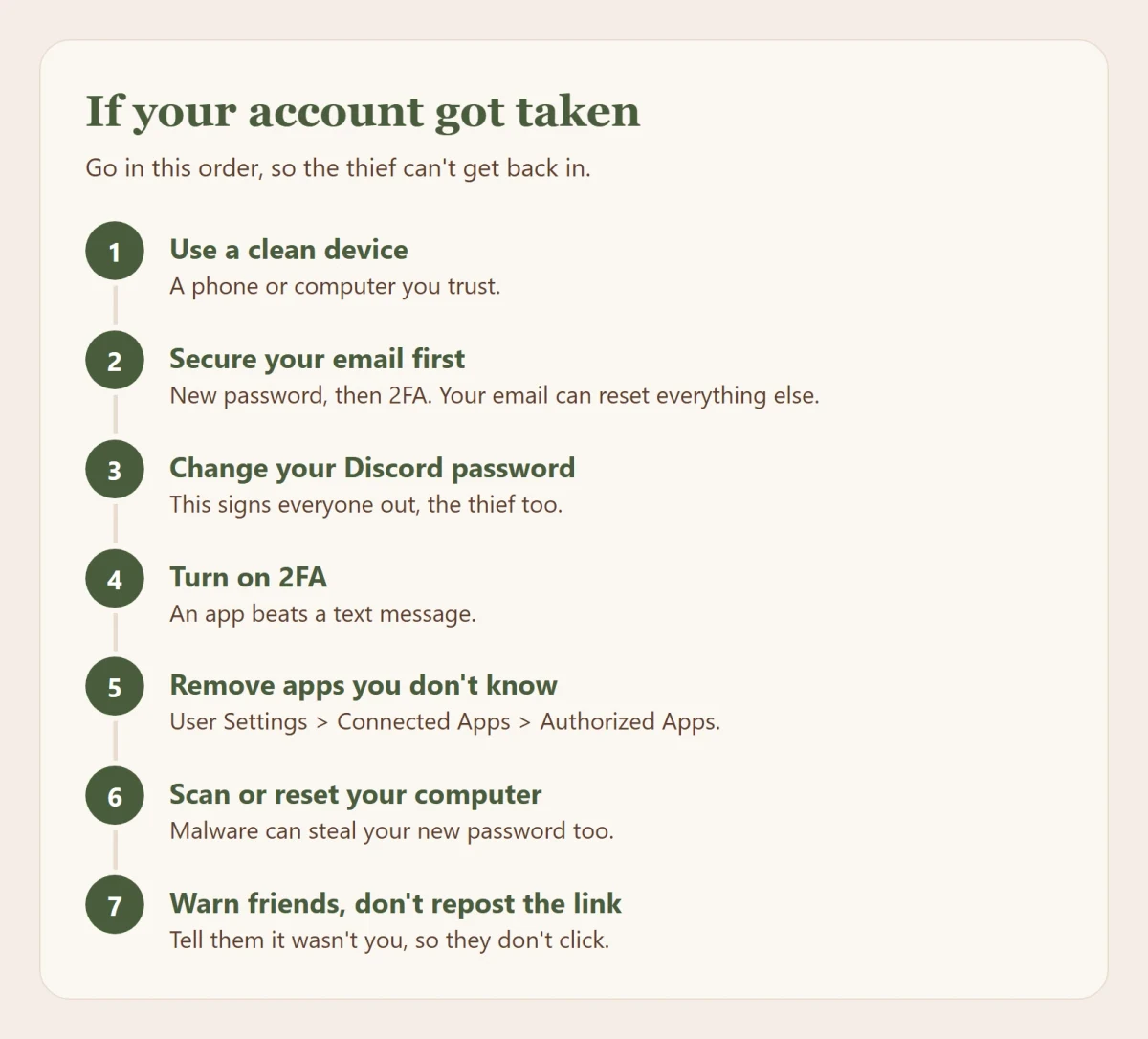
- Use a device you trust. If you ran something suspicious on your computer, do the next steps from your phone or another computer.
- Secure your email first. Change its password, turn on 2FA, and check its settings for forwarding rules or filters you didn't make: attackers add those to get copies of your reset emails. Your email can reset everything else, so it comes first. If Discord emailed your old address to say the email on your account changed, that email has a Start Account Recovery button that works for 48 hours. A real recovery link always starts with
https://discord.com/wasntme/. - Change your Discord password. Discord says this signs out every device, which kicks the attacker out too. Then check User Settings > Account > Account Info > Logged-in Devices and sign out anything you don't recognize.
- Turn on 2FA on Discord, or check that it's still on and still your phone.
- Remove apps you don't recognize in User Settings > Connected Apps > Authorized Apps.
- Deal with the computer. If you ran a file or pasted a command, assume it's infected. Run a full scan with Windows Security, and if anything turns up, or your accounts keep getting taken again, back up your files and reset Windows. Then change the passwords you'd saved in your browser.
- Warn your friends, without spreading the scam. See below.
If you can't get back in at all, use Discord's hacked account form from a trusted device. Ignore anyone who offers to "get your account back" for a fee. They can't, and they'll take your money too. Discord's support team can't reset a password for you, so the email step above is your fastest way back.
Warning people without spreading it
- Say what happened plainly: "My account was taken over last night and sent a Nitro link. Don't open it."
- Don't repost the link as a link. Write it so it can't be clicked, like
hxxps://free-nitro[.]gift. Security teams call this "defanging". - If someone else's account is sending scams, say it "looks hacked". They're probably a victim too.
Saving evidence
Before deleting scam messages, right-click one and choose Copy Message Link, and take a screenshot. That's what Discord and our staff need to act on it. Then report it to Discord: right-click the message (or press and hold on a phone) and choose Report Message. Never open a suspicious file to "see what it does".
Getting help at Rosa
If a scam reached you through the Reserve, or someone from the Reserve sent you one, tell us. Use /report in our Discord, or open a ticket if you're not sure. If your own account was taken and sent something in our server, open a ticket once you're back in. Nobody gets in trouble for being hacked.
Rosa staff will never ask for your password, a 2FA code, a QR scan, a payment or remote access to your computer, and our bots never ask you to sign in anywhere but rosarealism.com.
You don't have to be scared
A guide like this can make the internet sound scarier than it is. It isn't out to get you, and you won't break anything by opening a link to a creator's merch store. What matters is being a little skeptical at the moments that count: when something asks you to sign in, download, scan, approve or pay.
Scams work on a bad moment, not a bad person. You're tired, rushed, excited, or the message comes from someone you trust. Noticing that feeling is most of the work.
A few things make it easier to relax:
- Keep your important files somewhere else too, on an external drive or in a cloud backup. Then resetting your computer is never a disaster, and just knowing you can is a weight off.
- Reset a second-hand computer before you use it. You don't know what the last owner installed. Back up anything you need, then reset it through Windows' own settings.
- Ask, don't guess. Security communities online can be a great help, but some people there spread bad advice or panic over nothing, so check what you read against a trusted source. And at the Reserve, you can always open a ticket and ask us.
Under the hood
For the curious. You don't need any of this to stay safe, but it explains why the advice above is what it is.
Why stolen sessions get past 2FA
Your password and 2FA prove who you are once, at sign-in. After that, the site gives you a session token or cookie, and every request after that just shows the token. Steal the token, and you skip the part where the password and code are checked.
There are three main ways to steal one:
- Malware on the device reads it from where the browser or app stores it. Chrome on Windows has added protections since 2024 that tie saved cookies to Chrome itself, and attackers have answered by injecting into the browser or abusing its debugging features instead. It's an ongoing back and forth.
- A fake page that passes everything on. Some phishing kits sit in the middle between you and the real site. You see the real sign-in, enter your real code, and the kit collects the session that comes out the other end. This is why passkeys matter: they check the real domain, so a page in the middle can't use them.
- Approving the attacker's sign-in yourself, which is what Discord's QR code scam does.
Changing your password makes Discord throw away the existing token. That's why it's step 3 above, and why it only helps once the malware that stole the token is gone.
What authorizing an app actually gives away
When you press Authorize, Discord gives the app a limited key with scopes: named permissions like identify (your username and avatar), email, guilds (which servers you're in) or guilds.join (adding you to servers). The app never sees your password or your real account token, and it can only do what the scopes allow.
Adding a bot to a server is different. The bot scope plus a set of server permissions decide what the bot can do there, and Administrator means everything. A malicious bot with Administrator can delete channels, ban members and create webhooks to post as anyone. If you run a server, give bots only the permissions they need.
Supply chain attacks
You can do everything right and still be hit through something you trusted. Attackers go after the makers: a developer's account, a build server, a popular package. Then they push a bad update to everyone at once. In late 2024, attackers tricked Chrome extension developers into approving a fake app, then published poisoned updates of a dozen or so extensions that stole session cookies. The fix for you is the same as always: fewer extensions and programs, from makers who take security seriously, and paying attention when something suddenly asks for more.
When a file really can attack you
Pictures, videos and documents are read by code called a parser, and parsers written in older languages can have memory bugs. The 2023 WebP bug, known as CVE-2023-4863, was a mistake in the code that decodes WebP pictures, used by Chrome, Firefox and many other apps. A crafted picture could trigger it, and it was used in real attacks before the fix. Those bugs are rare, valuable and usually aimed at specific high-value people. Updates close them, and keeping your software current is what protects you.
The whole guide in one list
- Go to sites yourself to sign in. Don't sign in through links.
- A different password everywhere, kept in a password manager.
- 2FA on, starting with your email. An authenticator app beats a text message.
- Read the address from the right, in links and in email senders.
- Gift cards, crypto or "pay to get your account back" means it's a scam.
- If someone threatens to share pictures of you, don't pay, keep the evidence and tell someone you trust.
- Only run programs you went looking for, from the real source.
- Never scan a QR code, press Windows + R or paste a command because a page told you to.
- Read what an app or extension asks for before you allow it.
- Keep your phone, computer, browser and Discord updated.
- Once a year, clear out your authorized apps and sign out of devices you don't recognize.
- Check with friends another way when their message feels off.
- If something goes wrong: trusted device, email first, then Discord, then the computer.
Questions about anything in here? Open a ticket and ask. There's no such thing as a silly question about staying safe.
Sources and further reading
Everything in this guide comes from the people who build these services and the people who study the attacks. If you want to go deeper, start here.
Spotting scams
- How to recognize and avoid phishing scams, US Federal Trade Commission
- Phishing: spot and report scam emails, texts, websites and calls, UK National Cyber Security Centre
- Recognize and report phishing, US Cybersecurity and Infrastructure Security Agency
- How to spot a CAPTCHA scam, US Federal Trade Commission, June 8, 2026
- Think before you Click(Fix), Microsoft, August 21, 2025
- An update on the lock icon, Google Chrome, May 2, 2023
- Fake verification pages are stealing Steam accounts from players, Malwarebytes, June 12, 2026
Discord
- Protecting against scams on Discord, Discord Safety Center
- Discord official messages, Discord
- QR code login FAQ, Discord
- My Discord account was hacked or compromised, Discord
- My Discord email was changed and I want to undo it, Discord
- Scam and phishing bots, Discord
- Safer ways to shop on Discord, Discord
- From trust to threat: hijacked Discord invites, Check Point Research, June 12, 2025
- The "I accidentally reported you" Discord scam, Bitdefender, February 27, 2026
Sextortion and pictures
- Sextortion, National Center for Missing & Exploited Children
- Take It Down, National Center for Missing & Exploited Children
- Avoid and report phishing emails, Google
- Protect yourself from phishing, Microsoft
- How to avoid a scam, US Federal Trade Commission
Passwords and two-step sign-in
- Digital identity guidelines: authentication, US National Institute of Standards and Technology, July 31, 2025
- Implementing phishing-resistant MFA, US Cybersecurity and Infrastructure Security Agency
- Three random words, UK National Cyber Security Centre
- Have I Been Pwned and Mozilla Monitor
Malware and downloads
- "Can you try a game I made?", Malwarebytes, January 3, 2025
- Malware delivered through YouTube game cracks, Proofpoint, April 3, 2024
- VVS Discord stealer, Unit 42, January 2, 2026
- Malware pushed through search ads for VLC, 7-Zip and CCleaner, BleepingComputer, January 17, 2023
- Supply chain attack against Chrome extensions, Sekoia, January 22, 2025
- CVE-2023-4863, US National Vulnerability Database
When something went wrong
- Recovering a hacked account, UK National Cyber Security Centre
- Security fatigue can cause computer users to feel hopeless, US National Institute of Standards and Technology, October 4, 2016